
 duffyduckandClaude Opus 5
d9d9345d03
duffyduckandClaude Opus 5
d9d9345d03
Zwei Luecken, die seit dem Umbau offenstanden.

1. Transfer-Laufwerke waren aus dem Explorer nicht erreichbar

F2 zeigte nur die Dateisysteme des Snapshots. Jetzt stehen die
Transfer-Laufwerke in derselben Liste - aus Sicht des Bedieners ist es
dieselbe Frage ("wo soll ich hinschauen?"), und der Weg ueber
pvesnap-recovery entfaellt.

Das gewaehlte Laufwerk landet im rechten Fenster, links bleibt der
Snapshot. Damit laesst sich direkt aus einem Snapshot auf das
Austauschmedium kopieren, das anschliessend in die wiederhergestellte
Maschine wandert - ohne Zwischenlager auf dem Host.

Ausgehaengt wird beim Verlassen, und zwar nur, was wir selbst eingehaengt
haben: ein Laufwerk, das schon vorher am Host hing, gehoert jemand
anderem. Das finally faengt auch Absturz und Strg-C ab - bliebe es
eingehaengt, gaelte es spaeter als belegt.

2. cleanup fand geschuetzte Snapshots ohne Klon nicht

Loescht jemand eine Wiederherstellung in der Proxmox-Oberflaeche, raeumt
Proxmox den Klon durchaus mit ab - aber nicht den Schutz seines
Quell-Snapshots (rbd snap protect, den setzt es beim Klonen selbst).
Zurueck bleibt ein geschuetzter Snapshot ohne Klon: die Vorhaltezeit
scheitert an ihm jede Nacht mit "snapshot is protected", und
find_orphans() findet prinzipiell nichts, weil es den Datentraeger, nach
dem es sucht, wirklich nicht mehr gibt. Dasselbe entsteht nach einem von
Hand ausgefuehrten rbd flatten.

find_stale_protections() sucht deshalb direkt nach der Ursache: jeder
geschuetzte Snapshot, an dem kein Klon haengt. Ein solcher Schutz hat
keinen Zweck - er existiert einzig dafuer, dass ein Klon seine Grundlage
behaelt. Geloest wird nur der Schutz, geloescht wird nichts. Vor jedem
Loesen wird ein zweites Mal nachgesehen, ob inzwischen doch ein Klon
daran haengt.

cleanup laeuft damit in zwei Durchgaengen und liegt neu auch in der
Oberflaeche auf Taste c - man sucht sonst lange nach einem Befehl, den
man nur im Notfall braucht.

Getestet gegen die Kulisse der Handbuch-Werkstatt: die rbd-Attrappe
kennt jetzt snap ls und children und enthaelt beide Zustaende
nebeneinander - ein geschuetzter Snapshot mit Klon (muss in Ruhe
gelassen werden) und einer ohne (muss gefunden werden).

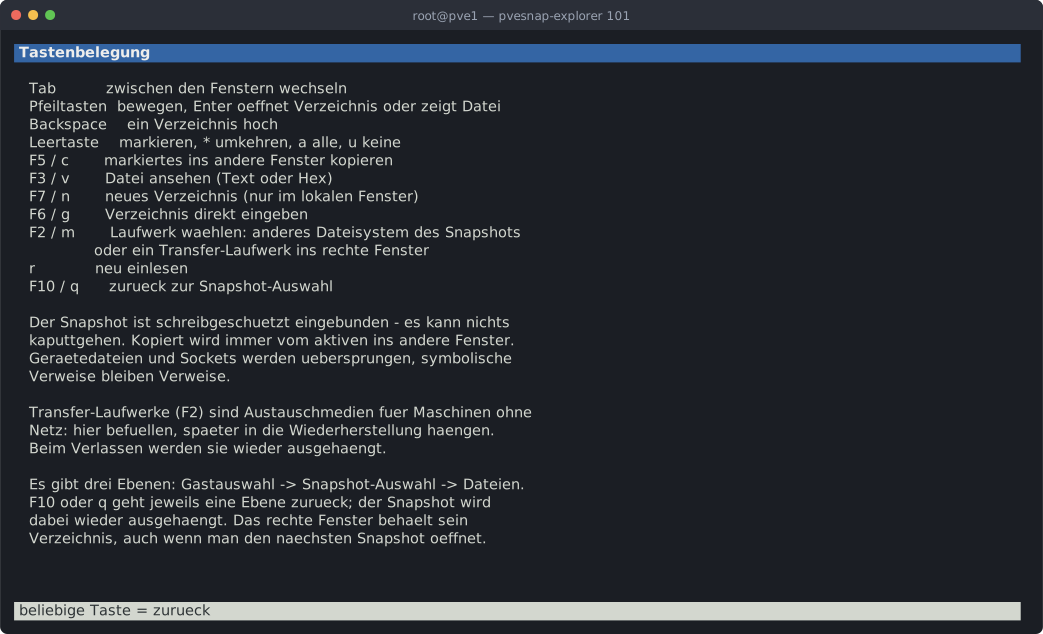
Handbuch und README nachgezogen, zwei Bildschirmfotos dazu.

Co-Authored-By: Claude Opus 5 (1M context) <noreply@anthropic.com>
35 lines
6.4 KiB
XML
35 lines
6.4 KiB
XML


<svg xmlns="http://www.w3.org/2000/svg" viewBox="0 0 1042.8 634.0" width="1043" height="634" font-family="ui-monospace, SFMono-Regular, Menlo, Consolas, 'DejaVu Sans Mono', monospace" font-size="14.5">
|
|
<rect width="1042.8" height="634.0" rx="7" fill="#1b1e24"/>
|
|
<path d="M0 7a7 7 0 0 1 7-7h1028.8a7 7 0 0 1 7 7v23.0H0z" fill="#2b2f38"/>
|
|
<circle cx="16.0" cy="15" r="5" fill="#ed6a5e"/>
|
|
<circle cx="33.0" cy="15" r="5" fill="#f4bf4f"/>
|
|
<circle cx="50.0" cy="15" r="5" fill="#61c554"/>
|
|
<text x="521.4" y="20" fill="#9aa3b2" font-size="12" text-anchor="middle">root@pve1 — pvesnap-explorer 101</text>
|
|
<rect x="14.0" y="44.0" width="1006.6" height="18.4" fill="#3465a4"/>
|
|
<text x="14.0" y="57.3" fill="#eeeeec" font-weight="bold" textLength="1006.2" lengthAdjust="spacing" xml:space="preserve"> Tastenbelegung </text>
|
|
<text x="14.0" y="93.3" fill="#d3d7cf" textLength="1014.8" lengthAdjust="spacing" xml:space="preserve"> Tab zwischen den Fenstern wechseln </text>
|
|
<text x="14.0" y="111.3" fill="#d3d7cf" textLength="1014.8" lengthAdjust="spacing" xml:space="preserve"> Pfeiltasten bewegen, Enter oeffnet Verzeichnis oder zeigt Datei </text>
|
|
<text x="14.0" y="129.3" fill="#d3d7cf" textLength="1014.8" lengthAdjust="spacing" xml:space="preserve"> Backspace ein Verzeichnis hoch </text>
|
|
<text x="14.0" y="147.3" fill="#d3d7cf" textLength="1014.8" lengthAdjust="spacing" xml:space="preserve"> Leertaste markieren, * umkehren, a alle, u keine </text>
|
|
<text x="14.0" y="165.3" fill="#d3d7cf" textLength="1014.8" lengthAdjust="spacing" xml:space="preserve"> F5 / c markiertes ins andere Fenster kopieren </text>
|
|
<text x="14.0" y="183.3" fill="#d3d7cf" textLength="1014.8" lengthAdjust="spacing" xml:space="preserve"> F3 / v Datei ansehen (Text oder Hex) </text>
|
|
<text x="14.0" y="201.3" fill="#d3d7cf" textLength="1014.8" lengthAdjust="spacing" xml:space="preserve"> F7 / n neues Verzeichnis (nur im lokalen Fenster) </text>
|
|
<text x="14.0" y="219.3" fill="#d3d7cf" textLength="1014.8" lengthAdjust="spacing" xml:space="preserve"> F6 / g Verzeichnis direkt eingeben </text>
|
|
<text x="14.0" y="237.3" fill="#d3d7cf" textLength="1014.8" lengthAdjust="spacing" xml:space="preserve"> F2 / m Laufwerk waehlen: anderes Dateisystem des Snapshots </text>
|
|
<text x="14.0" y="255.3" fill="#d3d7cf" textLength="1014.8" lengthAdjust="spacing" xml:space="preserve"> oder ein Transfer-Laufwerk ins rechte Fenster </text>
|
|
<text x="14.0" y="273.3" fill="#d3d7cf" textLength="1014.8" lengthAdjust="spacing" xml:space="preserve"> r neu einlesen </text>
|
|
<text x="14.0" y="291.3" fill="#d3d7cf" textLength="1014.8" lengthAdjust="spacing" xml:space="preserve"> F10 / q zurueck zur Snapshot-Auswahl </text>
|
|
<text x="14.0" y="327.3" fill="#d3d7cf" textLength="1014.8" lengthAdjust="spacing" xml:space="preserve"> Der Snapshot ist schreibgeschuetzt eingebunden - es kann nichts </text>
|
|
<text x="14.0" y="345.3" fill="#d3d7cf" textLength="1014.8" lengthAdjust="spacing" xml:space="preserve"> kaputtgehen. Kopiert wird immer vom aktiven ins andere Fenster. </text>
|
|
<text x="14.0" y="363.3" fill="#d3d7cf" textLength="1014.8" lengthAdjust="spacing" xml:space="preserve"> Geraetedateien und Sockets werden uebersprungen, symbolische </text>
|
|
<text x="14.0" y="381.3" fill="#d3d7cf" textLength="1014.8" lengthAdjust="spacing" xml:space="preserve"> Verweise bleiben Verweise. </text>
|
|
<text x="14.0" y="417.3" fill="#d3d7cf" textLength="1014.8" lengthAdjust="spacing" xml:space="preserve"> Transfer-Laufwerke (F2) sind Austauschmedien fuer Maschinen ohne </text>
|
|
<text x="14.0" y="435.3" fill="#d3d7cf" textLength="1014.8" lengthAdjust="spacing" xml:space="preserve"> Netz: hier befuellen, spaeter in die Wiederherstellung haengen. </text>
|
|
<text x="14.0" y="453.3" fill="#d3d7cf" textLength="1014.8" lengthAdjust="spacing" xml:space="preserve"> Beim Verlassen werden sie wieder ausgehaengt. </text>
|
|
<text x="14.0" y="489.3" fill="#d3d7cf" textLength="1014.8" lengthAdjust="spacing" xml:space="preserve"> Es gibt drei Ebenen: Gastauswahl -> Snapshot-Auswahl -> Dateien. </text>
|
|
<text x="14.0" y="507.3" fill="#d3d7cf" textLength="1014.8" lengthAdjust="spacing" xml:space="preserve"> F10 oder q geht jeweils eine Ebene zurueck; der Snapshot wird </text>
|
|
<text x="14.0" y="525.3" fill="#d3d7cf" textLength="1014.8" lengthAdjust="spacing" xml:space="preserve"> dabei wieder ausgehaengt. Das rechte Fenster behaelt sein </text>
|
|
<text x="14.0" y="543.3" fill="#d3d7cf" textLength="1014.8" lengthAdjust="spacing" xml:space="preserve"> Verzeichnis, auch wenn man den naechsten Snapshot oeffnet. </text>
|
|
<rect x="14.0" y="602.0" width="1006.6" height="18.4" fill="#d3d7cf"/>
|
|
<text x="14.0" y="615.3" fill="#2e3436" textLength="1006.2" lengthAdjust="spacing" xml:space="preserve"> beliebige Taste = zurueck </text>
|
|
</svg> |