
 duffyduckandClaude Opus 5
59e7224297
duffyduckandClaude Opus 5
59e7224297
26 Kapitel in vier Teilen, in der Reihenfolge, in der man sie braucht:
erst sichern, dann Dateien holen, dann ganze Maschinen wiederherstellen,
dahinter der Nachschlagteil.

Gebaut wird mit MkDocs + Material. Bewusst ohne Netzabhaengigkeiten:
keine Schriften vom CDN (font: false), Volltextsuche mit deutschem
Stemming liegt neben den Seiten. Im Notfall steht vielleicht das halbe
Netz - dann nuetzt eine Doku im Internet nichts.

  handbuch/bauen.sh              baut handbuch/site/
  handbuch/bauen.sh ansehen      Vorschau auf 127.0.0.1:8000

install.sh nimmt das gebaute Handbuch mit nach
/usr/share/doc/pvesnap/handbuch/ - falls es vorliegt. Auf dem Host selbst
wird nichts gebaut, mkdocs gehoert nicht auf einen Hypervisor.

Die 28 Bildschirmfotos sind nicht abfotografiert, sondern erzeugt: Der
echte Programmcode laeuft in einem Pseudo-Terminal gegen einen erfundenen
Proxmox-Host (Attrappen fuer pvesh, perl und rbd), pyte baut den Bildschirm
nach, heraus faellt ein SVG. Damit stimmen sie garantiert mit dem Programm
ueberein, sind reproduzierbar und enthalten keine echten Daten. Die
Werkstatt dafuer liegt unter handbuch/werkstatt/ samt LIESMICH.md.

Nebenbei: die Schlussmeldung von install.sh warb noch mit --exchange,
das mit dem eingebauten Austauschlaufwerk weggefallen ist.

Co-Authored-By: Claude Opus 5 (1M context) <noreply@anthropic.com>
16 lines
1.9 KiB
XML
16 lines
1.9 KiB
XML
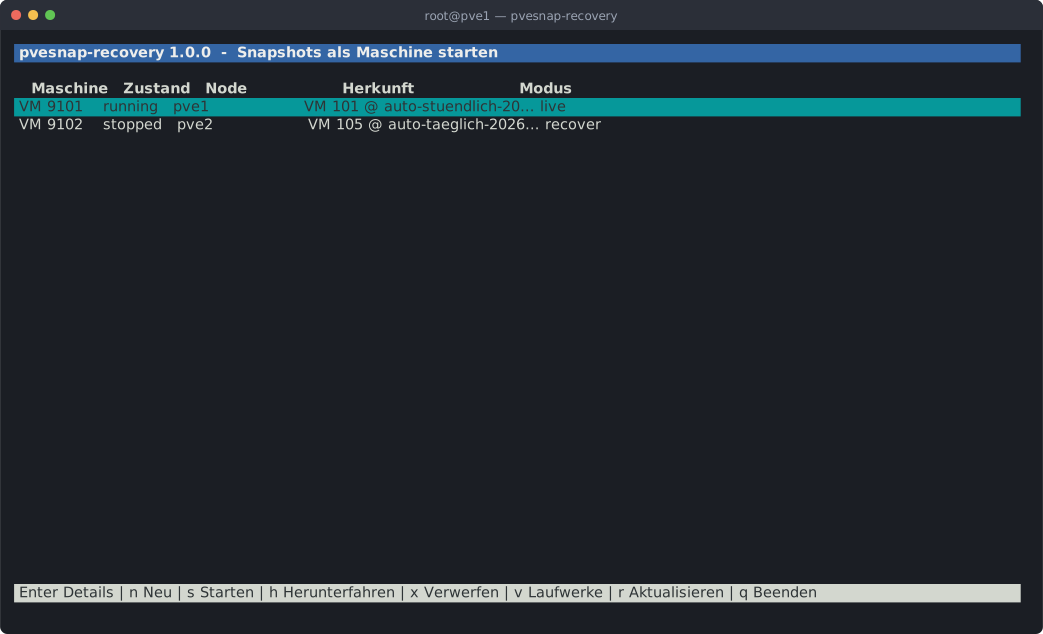


<svg xmlns="http://www.w3.org/2000/svg" viewBox="0 0 1042.8 634.0" width="1043" height="634" font-family="ui-monospace, SFMono-Regular, Menlo, Consolas, 'DejaVu Sans Mono', monospace" font-size="14.5">
|
|
<rect width="1042.8" height="634.0" rx="7" fill="#1b1e24"/>
|
|
<path d="M0 7a7 7 0 0 1 7-7h1028.8a7 7 0 0 1 7 7v23.0H0z" fill="#2b2f38"/>
|
|
<circle cx="16.0" cy="15" r="5" fill="#ed6a5e"/>
|
|
<circle cx="33.0" cy="15" r="5" fill="#f4bf4f"/>
|
|
<circle cx="50.0" cy="15" r="5" fill="#61c554"/>
|
|
<text x="521.4" y="20" fill="#9aa3b2" font-size="12" text-anchor="middle">root@pve1 — pvesnap-recovery</text>
|
|
<rect x="14.0" y="44.0" width="1006.6" height="18.4" fill="#3465a4"/>
|
|
<text x="14.0" y="57.3" fill="#eeeeec" font-weight="bold" textLength="1006.2" lengthAdjust="spacing" xml:space="preserve"> pvesnap-recovery 1.0.0 - Snapshots als Maschine starten </text>
|
|
<text x="31.2" y="93.3" fill="#d3d7cf" font-weight="bold" textLength="670.8" lengthAdjust="spacing" xml:space="preserve">Maschine Zustand Node Herkunft Modus</text>
|
|
<rect x="14.0" y="98.0" width="1006.6" height="18.4" fill="#06989a"/>
|
|
<text x="14.0" y="111.3" fill="#2e3436" textLength="1006.2" lengthAdjust="spacing" xml:space="preserve"> VM 9101 running pve1 VM 101 @ auto-stuendlich-20… live </text>
|
|
<text x="14.0" y="129.3" fill="#d3d7cf" textLength="1014.8" lengthAdjust="spacing" xml:space="preserve"> VM 9102 stopped pve2 VM 105 @ auto-taeglich-2026… recover </text>
|
|
<rect x="14.0" y="584.0" width="1006.6" height="18.4" fill="#d3d7cf"/>
|
|
<text x="14.0" y="597.3" fill="#2e3436" textLength="1006.2" lengthAdjust="spacing" xml:space="preserve"> Enter Details | n Neu | s Starten | h Herunterfahren | x Verwerfen | v Laufwerke | r Aktualisieren | q Beenden </text>
|
|
</svg> |